Online office hours
[[Scheduling an ONLINE meeting]]
- Check the day, and time table below.
- Click this link to schedule an ONLINE meeting.
- Choose a 15-min time slot. Book the next time slot if we need more than 15 minutes.
- Type your first and last name, CSUMB email address, and the meeting agenda in one sentence.
- Click Book.
- I will send you the Zoom link before the meeting. Please check your inbox before the meeting.
ONLINE office hours table (day and time)
-
| # |
Day |
Time |
| 1 |
Monday |
3:30 - 3:45 pm (Zoom) |
| 2 |
Monday |
3:45 - 4:00 pm (Zoom) |
| 3 |
Monday |
4:00 - 4:15 pm (Zoom) |
| 4 |
Monday |
4:15 - 4:30 pm (Zoom) |
| 5 |
Wednesday |
3:30 - 3:45 pm (Zoom) |
| 6 |
Wednesday |
3:45 - 4:00 pm (Zoom) |
| 7 |
Wednesday |
4:00 - 4:15 pm (Zoom) |
| 8 |
Wednesday |
4:15 - 4:30 pm (Zoom) |
Cancelling a meeting
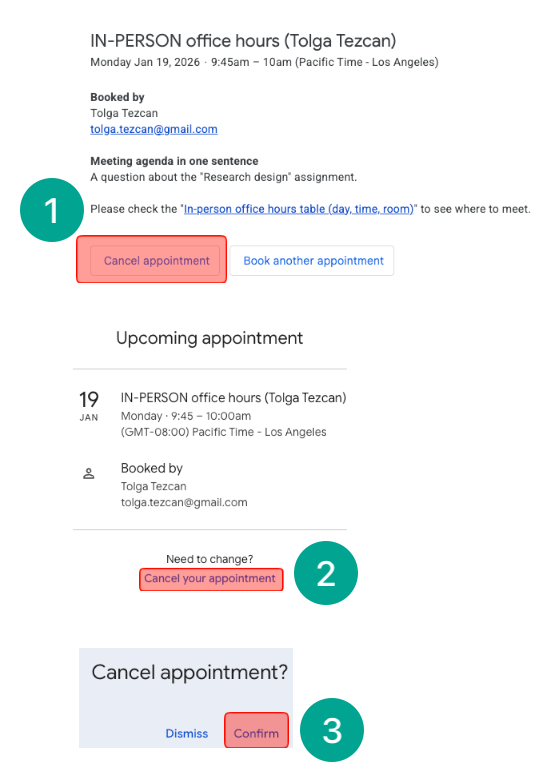
- Check your inbox: You received an email for the appointment. Click "Cancel appointment."
- Click "Cancel your appointment."
- Click "Confirm."