Pane
Pane view
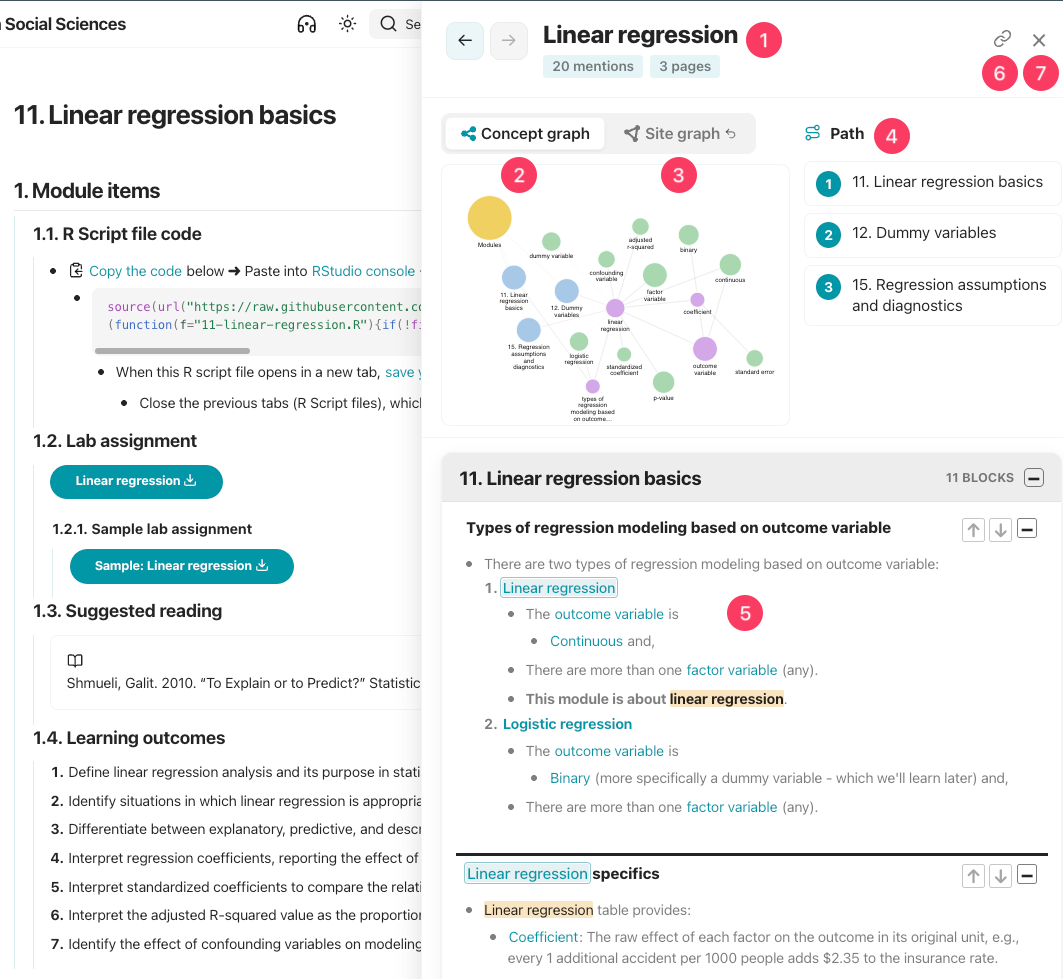
- This is the pane of "linear regression" wikilink.
- This part shows the number of mentions and pages including this concept, with back/forward controls.
- Shows the [[concept graph]] of "linear regression" wikilink.
- Clicking on the graph preview expands the graph.
- Return button : Appears only when the pane was opened from a site, page, or concept graph node click, and returns to that graph.
- "Site graph " appears because linear regression wikilink was clicked on the site graph.
- After reviewing this concept in the pane, users can go back to the site graph with that button.
- [[Path]]: The pages mentioning this concept.
- Clicking on one of the pages on path will scroll the pane.
- The content. Wikilinks are highlighted in blue, same concept without wikilinks are highlighted in yellow.
- Minimize cards to scroll through a long list of entries faster.
- Scroll context with ↑/↓ buttons to read more of the surrounding content, if more context available under the sections.
- Clicking cards to navigate to that exact location on the page and keeps the pane closed.
- Share: Pane card state IDs are included the page URL.
- Copy the URL to share a specific pane view with users; the link opens that pane and its current cards.
- Close button: Closes the pane.
- It can be reopened with the "Pane" button in the heading.
- It restores the views, and the ←/→ buttons navigate backward and forward through the view history.